Live Chat and Order Tracking for Whiteout Survival
Once a Whiteout Survival order is paid for, two things keep you informed: the Order Record and the live chat. The record shows the status at any time, and the chat is staffed 24/7 by a real person. The published window for this catalogue is usually 10–30 minutes once your details are in, so most questions are answered by the record before anyone needs to type.

Key takeaways
- The Order Record keeps the status visible at any time, and a confirmation email follows when the order completes.
- Live chat is staffed 24/7 by a real person, with no cut-off hour before or after the purchase.
- Have the login method — Facebook or Google — plus the account and password ready, because the chat will ask which one you used.
- Orders are published as usually 10–30 minutes once the details are in; one active session per account is allowed.
Tracking an order after payment
Payment is not the end of the process here. This catalogue works as a login top-up, so the store signs in, buys the pack in the shop and then signs out. Between those two moments the order sits in the Order Record, and the page describes the record as visible at any time rather than only at checkout.
That makes the record the first place to look and the last place to refresh. Open it and read the status line: if the order is still running, waiting is the correct action, because the published window is usually 10–30 minutes from the point your details are complete. If the status has moved to closed and the confirmation email has arrived, the order is done and the balance is yours to check in-game.
The record does a second job over time. It keeps a history, which is useful when you want to repeat a purchase exactly — same tier, same price pair — without hunting through the page again.
It also helps to know what the order actually contains. This catalogue is bought as a pack rather than a token top-up: Frost Stars convert at face value, so a dollar in is a dollar of pack out. That is why the record shows a product and a price rather than a currency balance — the pack is the item, and the token count is simply how the game labels its cost.
What the live chat is for
The chat is not a replacement for the record; it is the escalation path when the record has not moved or when something about the details is wrong. It runs around the clock, staffed by a real person, before and after the order. That matters because orders here are not tied to office hours: a midnight purchase gets the same support as a lunchtime one.
Which questions belong there? A status that has not changed well past the slow end of the window. A login method that may have been entered incorrectly. Two-step verification that needs a code delivered during the order — send it only through the order chat, never in a private message. And anything about a refund: the site publishes a Full Refund Guarantee stating that if an order is not delivered or cannot be used, you receive a full refund.
Before you write, gather the facts. A message that opens with the order number, the game, the tier and the login method gets a useful answer faster than "it has not arrived".
What to have ready for the conversation
Four items cover almost every question the chat can ask.
| Item | Where it comes from | Why the chat asks for it |
|---|---|---|
| Login method | Facebook or Google, whichever opens your save | The order is tied to that identity, not to a character name |
| Account and password | The same identity you logged in with | Confirms the account the pack was bought on |
| Order number | The confirmation and the Order Record | Points the support agent at the right transaction |
| Tier or pack bought | The product line on the game page | Distinguishes an ANY band from a named bundle |
None of these is hard to find, and all of them are things you already had when you placed the order. Keeping them in one note after checkout takes a minute and removes the awkward part of a support conversation.
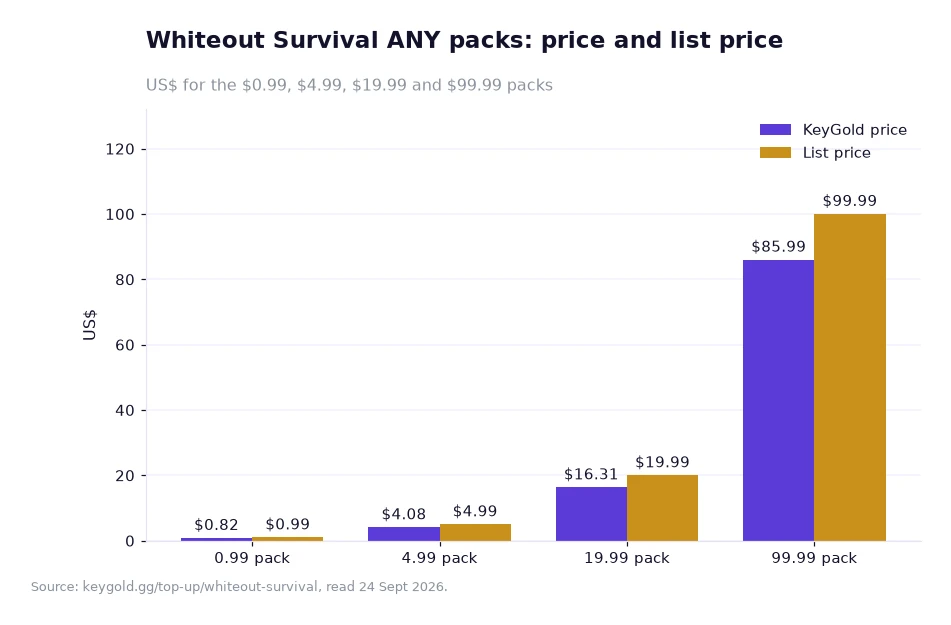
What the tracked tiers cost, in one picture
The chart above prices the Whiteout bands that most orders land on, and it plots each one twice: 0.99 at $0.82 against a $0.99 list price, 4.99 at $4.08 against $4.99, 19.99 at $16.31 against $19.99, and 99.99 at $85.99 against $99.99. Keep those pairs to hand while a chat is running, because the first question a support agent asks about a traced order is which band was bought, and a band is identified by its tier name rather than by the amount charged.
Different band, same three-part order: details in, window running, record to check. Whiteout runs on usually 10 to 30 minutes, so the slow end is 30 minutes and the fast end is 10 — the two figures quoted earlier in this article, and the two worth comparing against a clock if an order ever has to be traced.
Worked example: a year of one tier each month
Assume you buy the $4.99 ANY tier once a month for twelve months. Both prices are published; the yearly totals are this article's own arithmetic.
Step one, the published price: $4.08 per order. Step two, the monthly comparison: $4.99 at the list price. Step three, one month's difference: 4.99 − 4.08 = $0.91, which is 0.91 / 4.99 = 18.2% below list. Step four, twelve months: 12 × 4.08 = $48.96 at the published price against 12 × 4.99 = $59.88 at list, a difference of 59.88 − 48.96 = $10.92 across the year.
Now add the tracking habit to the same example. Twelve orders means twelve short windows, and each one is a separate transaction on the same account. Because one active session per account is allowed, the orders cannot overlap — so the practical routine is one order, one confirmed close, then the next. If you keep the twelve order numbers in a single note, the Order Record and the chat both become quick to use.
Frequently asked questions
Where do I check the status of a Whiteout Survival order?
The Order Record shows the current status at any time you like, and a confirmation email arrives when the order completes.
What should I have ready before contacting live chat?
The order number, the login method you used — Facebook or Google — the account and password, and the tier or pack you bought.
Keeping the next order simple
After an order closes, do two small things: change your password, and keep the order number with the tier you bought. Both cost seconds and both pay off the next time you buy. If you would rather not repeat the checkout from scratch, the Order Record shows exactly what was purchased last time, so matching it is a matter of reading the record rather than searching the page.
For everything else the store is explicit. Prices are shown in US dollars, a bank may add its own conversion fee if your card settles in another currency, and the game page carries a 4.9 rating from 811 evaluations. Live chat is staffed 24/7, and the published Full Refund Guarantee says that if an order is not delivered or cannot be used, you receive a full refund. Register before your first purchase and the new-user coupon — one coupon, no threshold, valid 30 days — is in your account from the start.
To place the next order, the Whiteout Survival page is where you can cheap frost stars whiteout survival packs through the login route, and it shows the ANY ladder and the named bundles in the same two-column format. If you want to see how tracking works on the other catalogues, the games list has them, and the blog covers the delivery windows side by side.
The order flow, support hours and prices above are taken from KeyGold's own pages, read 24 Sept 2026; the monthly and yearly totals are the author's example arithmetic on those published prices.[1]